How to Download & Analyze Your 23andMe Raw Data Free
Download your 23andMe .zip, see what its 600,000 positions mean, and read it free in your browser at healthosx.com/dna. Nothing uploaded by default.
To analyze your 23andMe raw data free, download the .zip from your 23andMe settings, then choose it at healthosx.com/dna. Your browser reads it on your own device, with nothing uploaded by default, and your DNA story opens straight away with no account. The full report of up to about 50 plain-language findings on food, sleep, exercise, heart health, medication genes and traits opens in the HealthOS app after a 6-digit code sent to your email, with an optional ancestry breakdown beside it.
The rest of this guide covers how to get the file out of 23andMe, what's actually inside it, and what it can and can't tell you that the 23andMe app doesn't already.
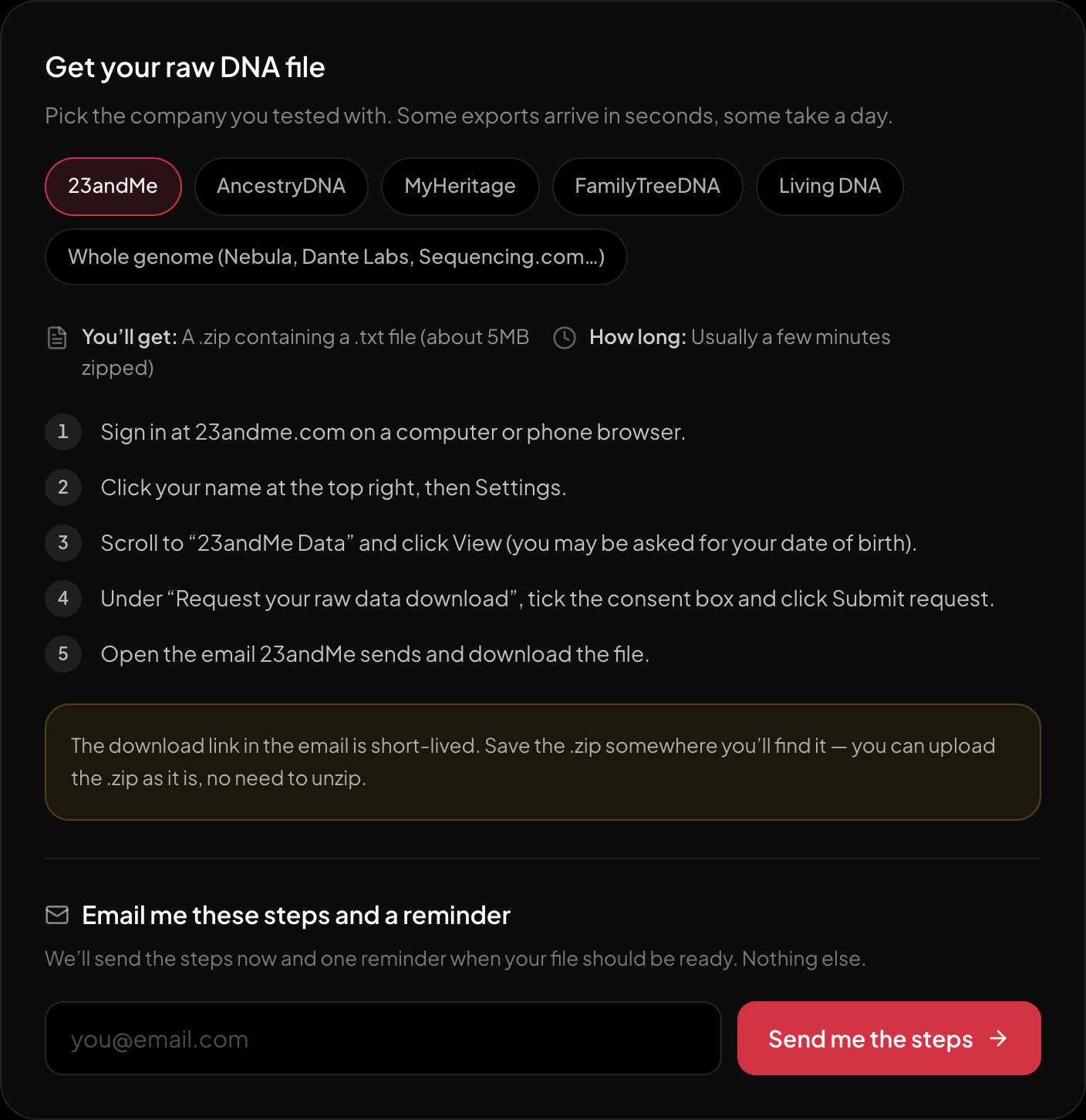
The download steps for 23andMe, on the page itself.
The same steps as below, next to the upload box — and it can email them to you with one reminder for when your file should be ready.
What your 23andMe raw data file is
The export is a plain text file inside a .zip. After a block of comment lines starting with #, every row is one position in your genome, four fields separated by tabs:
rs762551 15 75041917 AC
That's the rsID (the catalogue number for that position), the chromosome, the coordinate on it, and the two letters you carry there, one inherited from each parent. A current 23andMe chip reads roughly 600,000 to 650,000 positions, and the file lists every one, including positions the chip failed to read, written as --.
There's no interpretation in the file. 23andMe's own reports are built on a subset of those rows; the rest sit there unread, which is why so many people go looking for something that reads more of them.
How to download it
- 1.Sign in at 23andme.com on a computer or phone browser.
- 2.Click your name at the top right, then Settings.
- 3.Scroll to “23andMe Data” and click View (you may be asked for your date of birth).
- 4.Under “Request your raw data download”, tick the consent box and click Submit request.
- 5.Open the email 23andMe sends and download the file.
- What you get: A .zip containing a .txt file (about 5MB zipped)
- How long: Usually a few minutes
The download link in the email is short-lived. Save the .zip somewhere you’ll find it — you can upload the .zip as it is, no need to unzip.
What you'll see when you read it
On /dna the findings are grouped the way you'd actually think about them:
- You and food: caffeine clearance (CYP1A2), lactose tolerance (including the Arabian persistence variant, not only the European one), alcohol flush (ALDH2), bitter taste, how well you convert plant omega-3s, folate processing (MTHFR), vitamin D, celiac genes and G6PD deficiency.
- Heart and metabolism: lipoprotein(a), how much refined carbs matter for you (TCF7L2), salt sensitivity, an inflammation marker, and iron overload (HFE).
- Health and medications: CYP2C19, CYP2C9, VKORC1, SLCO1B1 (statins), TPMT, DPYD and two HLA drug-reaction markers, plus alpha-1 antitrypsin and LRRK2. These are the findings most worth telling a doctor or pharmacist about once.
- Sleep and movement: restless-sleep and sleep-quality variants, and the ACTN3 power-versus-endurance gene.
- Just you: eye colour, hair, freckles, earwax, blood group, the photic sneeze and motion sickness.
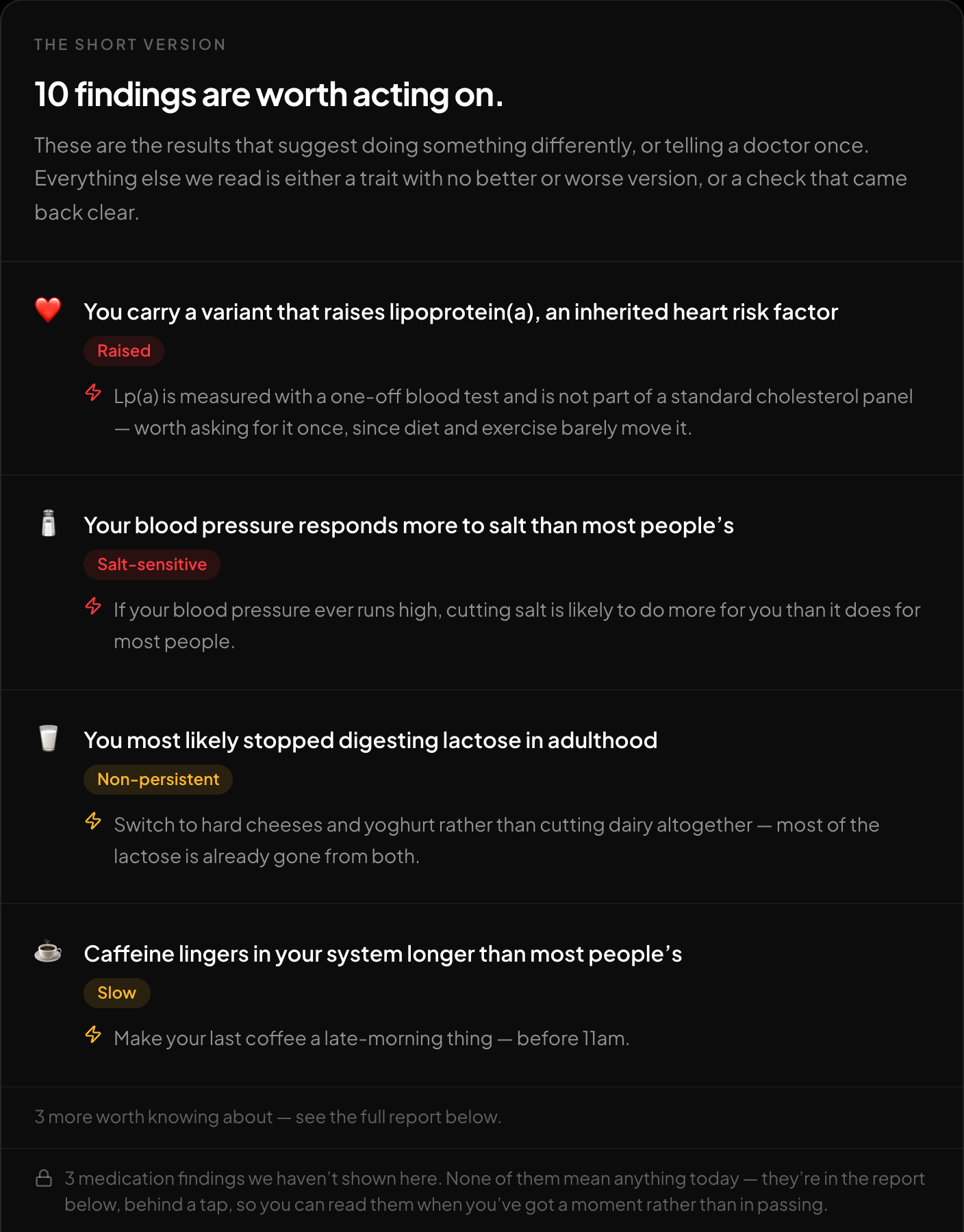
The short version: what is worth acting on, first.
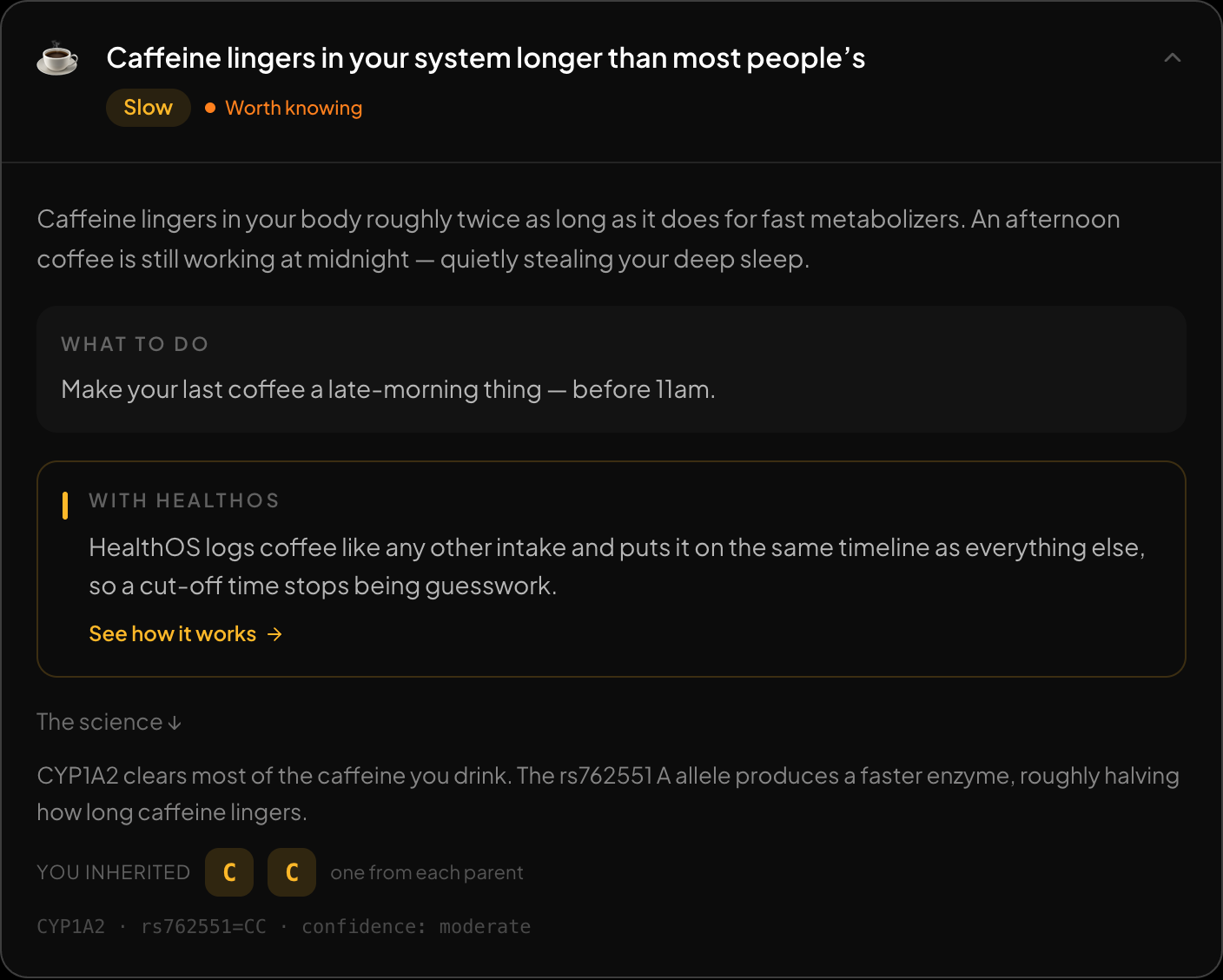
Every finding opens up: what it means, what to do, and the genotype behind it.
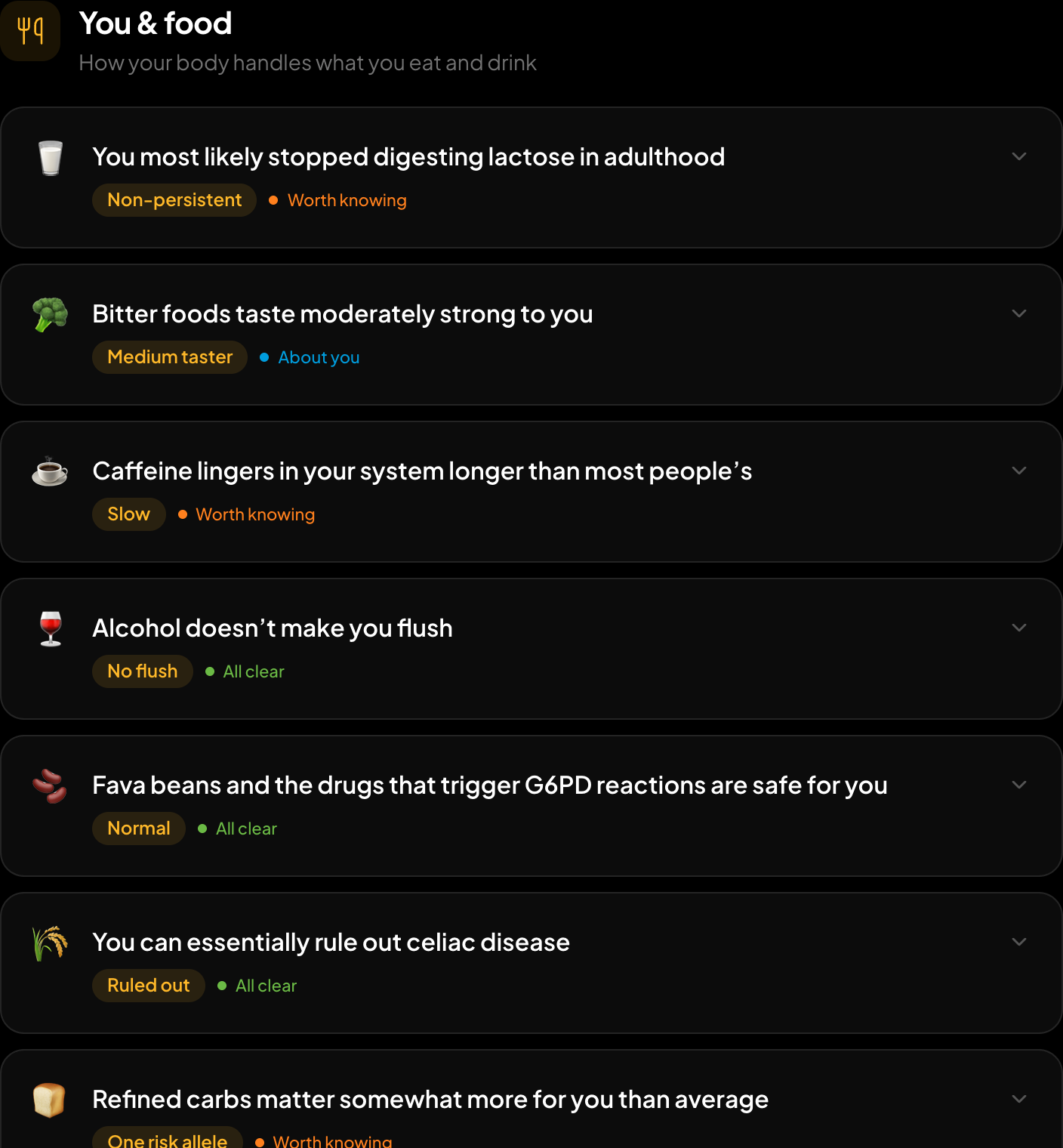
Findings grouped the way you would think about them.
The sample genome, read in the browser. Your own file produces the same report from your own genotypes.
Every finding opens to show what it means, what to do about it, and the genotype it was read from, with the published source behind it. If your file doesn't contain a position, the report says so rather than treating the gap as a negative result.
| What you want | From this file | Why |
|---|---|---|
| Traits, food and drink | Yes | Lactose, caffeine, alcohol flush, bitter taste, vitamin D, folate |
| Medication genes | Yes | CYP2C19, CYP2C9, VKORC1, SLCO1B1, TPMT, DPYD, HLA-B markers |
| CYP2D6 (codeine, tramadol) | No | Needs copy-number calling, which SNP data cannot do |
| Ancestry breakdown | Yes | 15 regions against 157 reference populations, plus the closest of 298 groups and 133 ancient ones |
| Maternal / paternal haplogroup | Partly | A chip carries some mtDNA and Y positions: a solid major branch, not the recent ones |
| Rare disease variants | Barely | A chip tests a handful per gene, and rare calls are often false positives |
| Finding relatives | No | Matching needs a database of other people: GEDmatch, MyHeritage, FamilyTreeDNA |
Scroll the table sideways for the rest →
Read on /dna in your browser, except ancestry, which — only if you agree — sends the markers it needs and keeps them with your result until you delete them.
Ancestry is the one part that can't run on your device, because the reference panel is several gigabytes. If you choose to run it, only the markers it needs are sent, and they're kept with your result until you delete them. You get proportions across 15 regions, from the Levant and Arabia to Southeast Asia and the Americas, plus the closest of 298 present-day populations.
Ask your DNA is an optional chat about your results. It asks for an email, the first five questions are free, and more cost $1 for five. If you choose to store your file with it (encrypted, deletable any time), it can also read things the free report deliberately leaves out, like your APOE type.
Your haplogroups need none of that. Your maternal and paternal lines are in the free report, and the free haplogroup finder gives just those two from your 23andMe file, read in your browser, with the branch path and how sure each placement is. What a haplogroup can and can't tell you.
What 23andMe raw data can't tell you
- It isn't a diagnosis. Chips read chosen positions and occasionally miscall one. Anything consequential needs confirming in an accredited lab.
- A missing variant isn't a clear result. If the chip didn't read a position, you've learned nothing about it. That matters most for rare disease variants, which a chip mostly doesn't cover. Chip versus whole genome.
- CYP2D6 isn't callable from a chip. It depends on whole-gene deletions and duplications that SNP data can't see, so a confident CYP2D6 call from 23andMe data is guesswork.
- Relatives need a database. Your matches live in 23andMe's DNA Relatives, or in GEDmatch and MyHeritage if you upload there.
Which chip version do you have?
Near the top of the file, a comment line names the array version. v5 (2017 onwards) is built on an Illumina GSA chip; v4 and v3 are older and read a different set of positions. It matters in one practical way: an older file can be missing a marker a newer one carries, which is why the report says "not covered" instead of guessing.
FAQ
Is it safe to use my 23andMe file on another site?
It depends where the file goes. Some tools upload and store it, others read it in the browser. The HealthOS report reads it in your browser and keeps nothing unless you choose to store it for the chat. How to check any tool's claim yourself.
Do I need to unzip it?
No. Choose the .zip as it downloaded.
Why was my file rejected?
Usually the download was cut short, or the file chosen was a PDF report rather than the raw data. Every rejection reason and its fix.
Can ChatGPT read my 23andMe file itself?
Not reliably. A 600,000-line genotype file is too big to read whole, and interpreting it needs a validated lookup table rather than recall. Here's what goes wrong.
Should I download my data before deleting my account?
Yes. Once the account is deleted the data is gone. See 23andMe after the bankruptcy.
Read your 23andMe file now. Free, read in your browser, and your DNA story needs no account: healthosx.com/dna
Common questions
- What free tools can I use to analyze my 23andMe raw data?
- healthosx.com/dna reads the .zip in your browser: up to about 50 plain-language findings on food, sleep, exercise, heart health, medication genes and traits, plus an optional ancestry breakdown. It is free: the file is read in your browser, and your DNA story opens straight away with no account. The full report opens in the HealthOS app after a 6-digit code sent to your email, and your file stays on your device. For relative matching, GEDmatch, MyHeritage and FamilyTreeDNA accept 23andMe files.
- How do I download my 23andMe raw data?
- Sign in at 23andme.com, click your name, then Settings. Under 23andMe Data click View, then under "Request your raw data download" tick the consent box and click Submit request. Download the .zip from the email straight away, because the link is short-lived. You can upload the .zip as it is.
- What is in a 23andMe raw data file?
- A text file of roughly 600,000 to 650,000 positions. Each row is an rsID, the chromosome, the position and the two letters you carry there. Positions the chip failed to read show as --. There is no interpretation in the file itself.
Related questions
No raw DNA file yet?
Get a HealthOS DNA Kit: spit in a tube at home, and your ancestry, lineages and traits arrive in your HealthOS account, with the raw file.
See the DNA kitWritten by
HealthOS Research