23andMe After the Bankruptcy: Download Your Data Before You Delete
Yes, you can delete 23andMe but keep analyzing your DNA elsewhere: download your raw data first, because once it’s deleted, it’s gone. 23andMe went bankrupt in 2025 and was sold to TTAM Research Institute. Here’s how to download, check and reuse the file.
Yes, you can delete 23andMe but keep analyzing your DNA elsewhere. Download your raw data first: deletion is permanent, and your raw file is the only copy of your results you can take with you. You can keep analyzing it afterwards, free, at healthosx.com/dna: health, medication and trait findings plus ancestry, read in your browser. Your DNA story needs no account; the full report opens in the HealthOS app after a code sent to your email. GEDmatch, MyHeritage and FamilyTreeDNA accept the same file for relative matching, and Promethease builds a paid report from it.
What happened to 23andMe
| When | What happened |
|---|---|
| March 2025 | 23andMe filed for Chapter 11 bankruptcy and co-founder Anne Wojcicki stepped down as CEO. Several US state attorneys general urged customers to consider deleting their data. |
| Spring 2025 | Around 1.9 million people deleted their data in the months that followed. |
| June–July 2025 | After Regeneron’s initial winning bid was topped, the company was sold for $305 million to TTAM Research Institute, a nonprofit led by Wojcicki. The court approved the sale and it closed in July. |
| Privacy terms | TTAM said it would keep 23andMe’s existing privacy policies, including letting customers delete their accounts and genetic data and opt out of research. |
| Background | A 2023 breach exposed data on about 6.9 million customers, and in 2025 the UK’s Information Commissioner fined the company £2.31 million over it. |
Dates as reported at the time. Company policies can change; check the current ones before deciding.
So whether to stay is a personal call. Whatever you decide, keep your own copy.
Step 1: download your raw data
- 1.Sign in at 23andme.com.
- 2.Click your name at the top right, then Settings.
- 3.Scroll to 23andMe Data and click View. You may be asked for your date of birth.
- 4.Under Request your raw data download, tick the consent box and click Submit request.
- 5.Open the email 23andMe sends and download the .zip. The link is short-lived, so do it straight away.
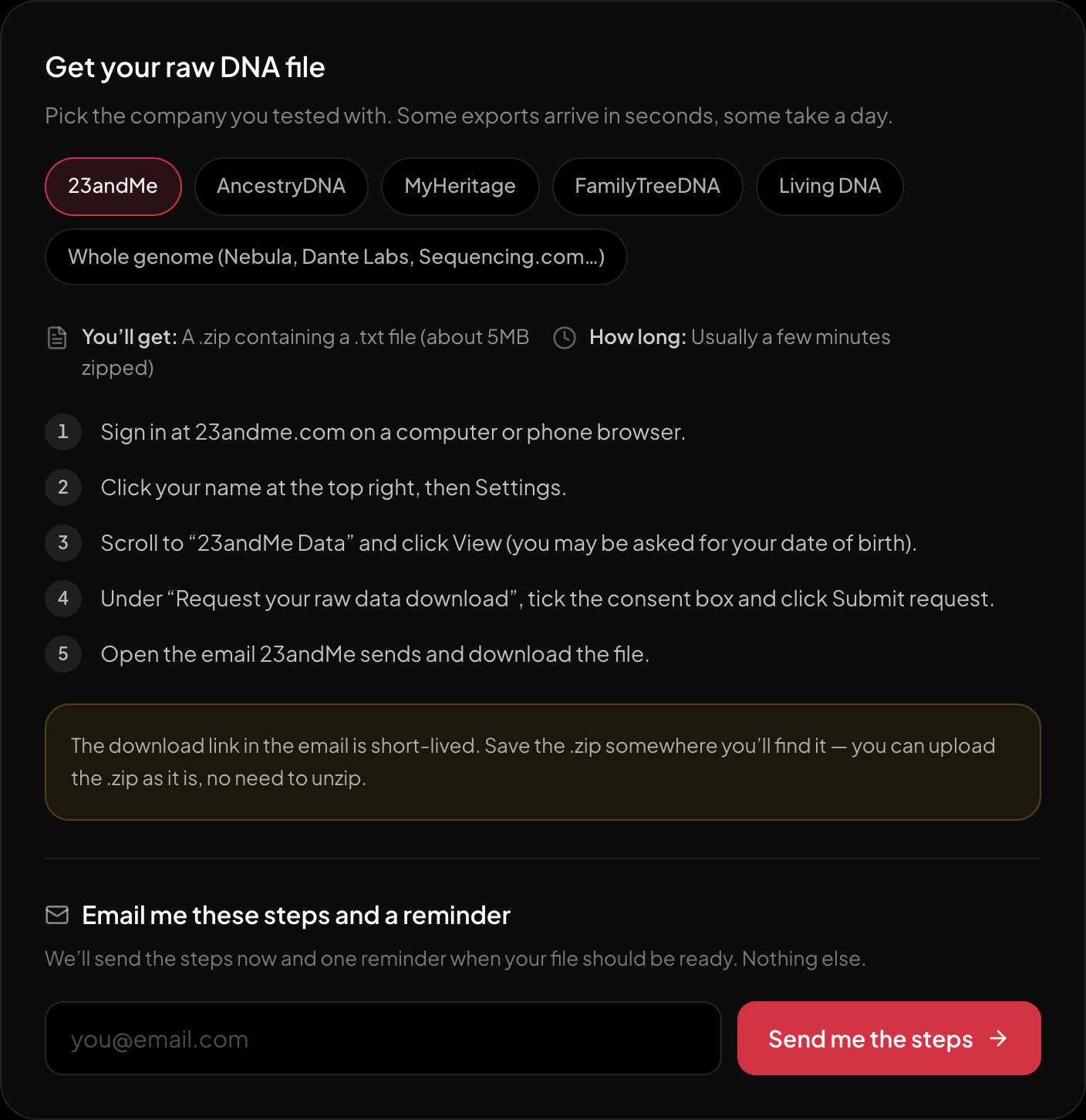
The download steps for 23andMe, on the page itself.
The same steps live on /dna, next to the box where you choose the file.
While you're on that page, it's worth downloading your ancestry composition and any reports you care about too. The raw file holds your genotypes, not 23andMe's interpretations of them.
Step 2: check the file works
Before you delete anything, make sure the file is complete. Choose the .zip at healthosx.com/dna. If it opens and shows findings, it's a complete export. The report runs in your browser, so this check doesn't upload your genome anywhere. A truncated download shows an error instead.
Step 3: store it safely
Keep the .zip somewhere encrypted: an encrypted drive, or a password manager that stores files. Don't leave it in your Downloads folder or email it to yourself. It's the most personal file you own.
Step 4: delete, if that's your choice
In Settings, under 23andMe Data, you'll find the option to permanently delete your data, followed by an email confirmation. Separately, check your research consent and whether you asked for your saliva sample to be stored. You can withdraw both.
What you keep, and what you lose
You keep everything in the raw file: about 600,000 genotypes you can read with other tools for health, medication genes, traits and a second ancestry opinion.
You lose DNA Relatives matches and messages, 23andMe's own reports, and any future updates. Screenshot or export anything you want to remember.
After deleting: reading the file elsewhere
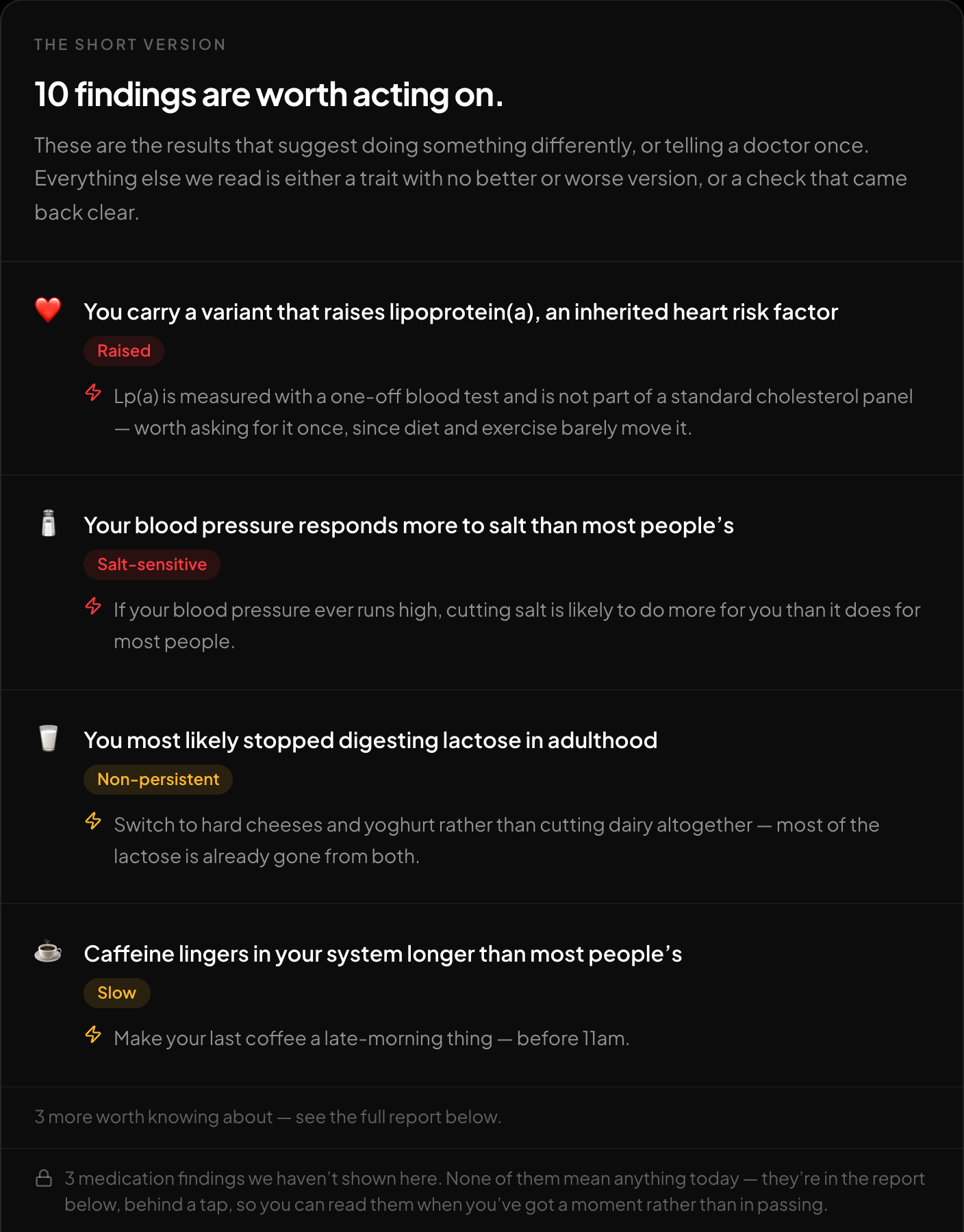
The short version: what is worth acting on, first.
Your exported file, read in the browser. The file is not uploaded, and your DNA story needs no account.
How to analyze your 23andMe raw data free walks through what the file can tell you. For relative matching, GEDmatch, MyHeritage and FamilyTreeDNA accept 23andMe uploads — read about safety first.
What deletion does and doesn't remove
Deleting your account is the strongest control you have, and it's worth knowing its edges:
- Research you already consented to may not be retrievable. Data already shared with research partners or included in completed studies generally can't be pulled back.
- Your saliva sample is a separate choice. If you agreed to biobanking, withdraw that too.
- Aggregate and de-identified data used in past analyses typically stays used.
- Relatives' data is theirs. Your close relatives' files still describe parts of your genome, whatever you delete.
None of that is a reason to skip deleting if that's your decision. It's a reason not to treat deletion as a time machine.
If you'd rather stay
Staying is a legitimate choice, and there are two settings worth reviewing either way:
- 1.Research consent — opt in or out, at any time.
- 2.DNA Relatives — whether you're visible to matches, and how much they see. This is the feature the 2023 breach abused, so it's worth a look even if you keep it on.
Then use a long, unique password and turn on two-factor authentication. Both breaches of consumer genetics companies so far have leaned on reused passwords rather than on breaking anything.
FAQ
Will my raw file still work in five years?
Yes. It's a text file of genotypes, and the rsID system it uses is stable. It'll be readable long after any particular website is gone.
Can I re-upload it to 23andMe later?
23andMe doesn't accept third-party uploads, so you'd need a new kit. GEDmatch, MyHeritage and FamilyTreeDNA do accept uploads.
Is the ancestry composition in the raw file?
No. The raw file holds genotypes, not 23andMe's interpretations — which is why downloading both is worth the extra minute.
Downloaded your file? Check it's complete and see what's in it, free, in your browser: healthosx.com/dna
Common questions
- 23andMe went bankrupt: should I download my data, and where can I use it?
- Yes. Download your raw data before you decide anything else, because deleting your account deletes it for good. 23andMe went bankrupt in 2025 and was sold to TTAM Research Institute. The raw .zip works elsewhere: healthosx.com/dna reads it free in your browser for health, medication and trait findings and an optional ancestry breakdown, GEDmatch, MyHeritage and FamilyTreeDNA accept it for relative matching, and Promethease builds a paid, SNPedia-linked report from it once you upload it.
- Can I delete 23andMe but keep analyzing my DNA elsewhere?
- Yes. Download the raw data first (Settings, then 23andMe Data, View, Request your raw data download), check that the .zip opens at healthosx.com/dna, store it somewhere encrypted, then delete. You keep the roughly 600,000 genotypes in the file. You lose DNA Relatives, 23andMe’s own reports and future updates.
- What is in the 23andMe raw data file?
- A .zip with a text file of about 600,000 genotypes: the rsID, chromosome, position and your two letters at each. It holds your genotypes, not 23andMe’s interpretations, so download any reports you care about separately.
No raw DNA file yet?
Get a HealthOS DNA Kit: spit in a tube at home, and your ancestry, lineages and traits arrive in your HealthOS account, with the raw file.
See the DNA kitReferences
- 1.23andMe: agreement for sale of business to TTAM Research Institute
- 2.TechCrunch: 23andMe files for bankruptcy — how to delete your data (March 2025)
For informational purposes only. For medical advice or diagnosis, consult a professional.
Written by
HealthOS Research