Why Was My DNA File Rejected? Every Common Cause and Fix
A PDF instead of raw data, a half-finished download, a VCF with no rsIDs, the wrong genome build, or a BAM picked instead of a VCF. How to tell which one hit you, and how to fix it.
DNA tools reject files for six common reasons: you chose a report instead of the raw data, the download didn't finish, the compression is one the browser can't read, a whole-genome VCF has no rsIDs, the file is on the wrong genome build, or you picked a BAM, CRAM or FASTQ instead of the VCF. Each has a quick fix, below. To see which one hit your file, drop it on the free DNA file checker: it reads the file in your browser, uploads nothing, needs no account, and reports the company, genome build, marker count, no-call rate, rsIDs and compression, with the reason and the fix.
| What you saw | What it means | Fix |
|---|---|---|
| “That doesn’t look like a genotype file” | You chose a report, not the raw data | Download the raw data from settings — a .zip or .txt |
| “We only found 4,812 markers” | The download was cut off | Download again on a computer, and let it finish |
| “The last compressed block is incomplete” | Truncated .gz | Download again |
| “Several compressed sections joined together” | A multi-part .gz browsers can’t stream | Unzip it, choose the plain .vcf or .txt |
| Empty report, or “no rsID annotations” | A whole-genome VCF with a dot in every ID column | Annotate against dbSNP, or use ancestry only |
| “Aligned to GRCh38, while our panel is GRCh37” | Build mismatch on a file with no rsIDs | Use an annotated VCF, or lift over to GRCh37 |
| Nothing opens it; the file is enormous | It’s a BAM, CRAM or FASTQ | Use the VCF instead |
Scroll the table sideways for the rest →
1. It's a report, not raw data
The error looks like: "That doesn't look like a genotype file."
Companies let you download PDFs, ancestry summaries and health reports. None of those contain genotypes. The raw data is a separate download, usually under settings or privacy:
- 23andMe: Settings → 23andMe Data → raw data download (a .zip)
- AncestryDNA: DNA → Settings → Download DNA data (a .zip)
- MyHeritage: DNA → Manage DNA kits → ⋯ → Download (a .zip with a .csv)
What to do with your raw data has download steps for every company.
2. The download didn't finish
The error looks like: "We only found 4,812 markers. A full export has hundreds of thousands." Or: "the last compressed block is incomplete."
A chip file lists hundreds of thousands of positions. If a tool finds only a few thousand, the file was cut off. This is common on phones, and on emailed links that expire mid-download. Fix: request a fresh download on a computer and let it finish.
Typical sizes. A chip file far smaller than this was probably cut off; a “raw data” file far bigger is reads, not variants.
Opening a CSV in Excel and saving it can also damage it, because Excel reformats columns. Always use the file exactly as it downloaded.
3. Compression the browser can't read
The error looks like: "several compressed sections joined together", or "your browser can't decompress .gz files."
Most .zip and .gz files open fine, and on /dna you can choose them without unzipping. Two exceptions: a .gz built from several joined sections (some pipelines produce these), and older browsers without built-in decompression. Fix: unzip it and choose the plain .txt or .vcf inside, or use a current Chrome, Edge or Safari.
4. A whole-genome VCF with no rsIDs
The symptom: the tool accepts the file but finds nothing, or says "no rsID annotations".
Look at the third column (ID) of the first data rows. If every row shows ., the variant caller never labelled the positions with rsIDs, and tools that search by rsID come back empty. Nebula and Dante Labs files are the usual culprits. Full explanation.
Fix: annotate against dbSNP (bcftools annotate), or ask your provider for an annotated VCF. On /dna, ancestry still runs on an rsID-less GRCh37 file, because it matches by position.
5. The wrong genome build
The error looks like: "aligned to GRCh38, while our reference panel is GRCh37."
Positions are measured against a version of the human reference genome, GRCh37 (hg19) or GRCh38 (hg38), and the same number points to different places in each. A tool that matched a GRCh38 file by position against a GRCh37 panel would read the wrong variants and give you a confidently wrong answer. Refusing is the honest response. Fix: use a VCF with rsIDs (rsIDs don't depend on the build), or lift it over to GRCh37. On /dna you can also keep the file in your HealthOS account, and it is converted to GRCh37 on our server.
6. BAM, CRAM or FASTQ instead of VCF
The symptom: the file is tens of gigabytes and nothing will open it.
Those are raw sequencing reads. Consumer tools read the VCF, the list of your variants. BAM, CRAM, FASTQ or VCF: which file do I use?
Check it before you upload it anywhere
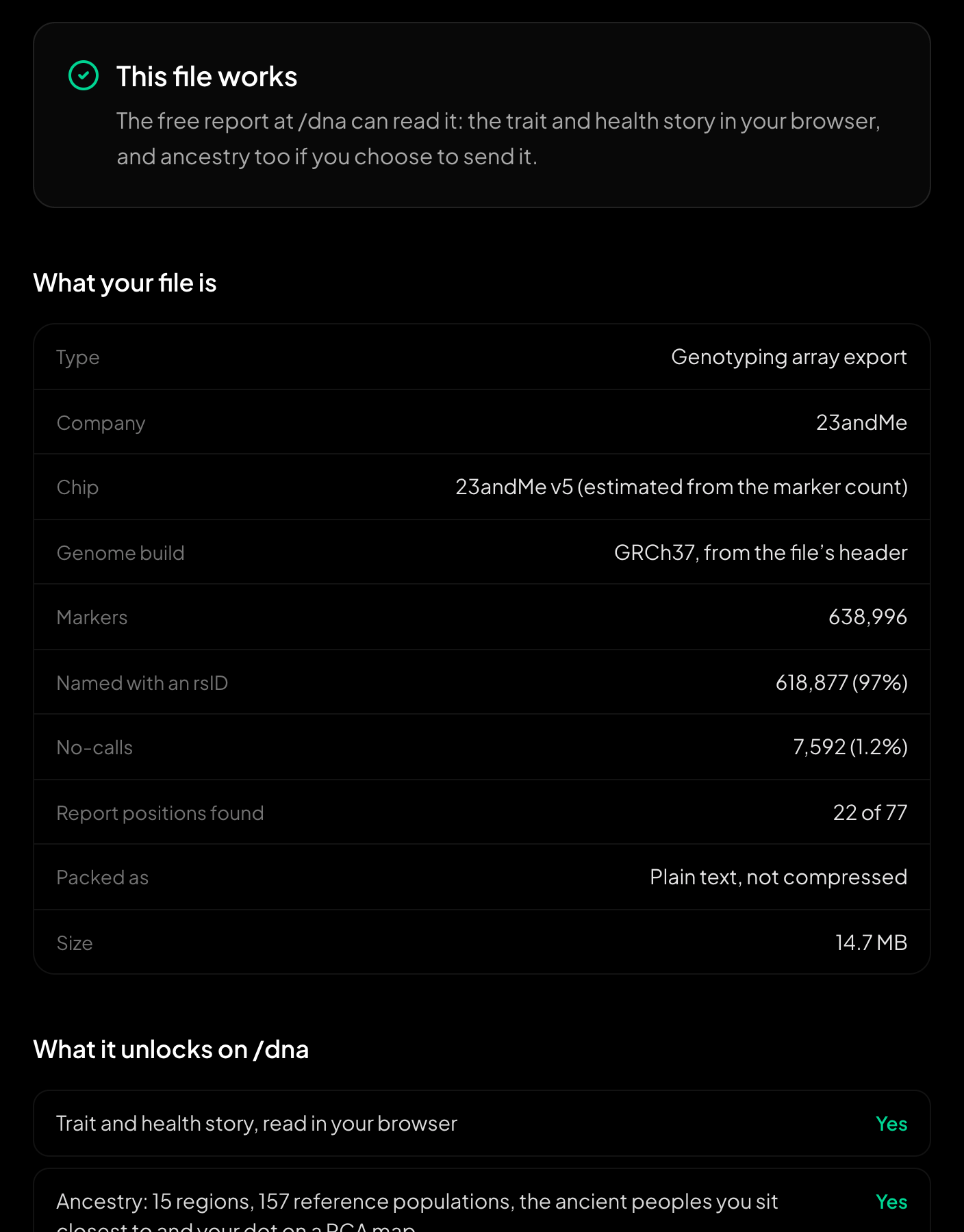
A 23andMe file that works, and what it holds.
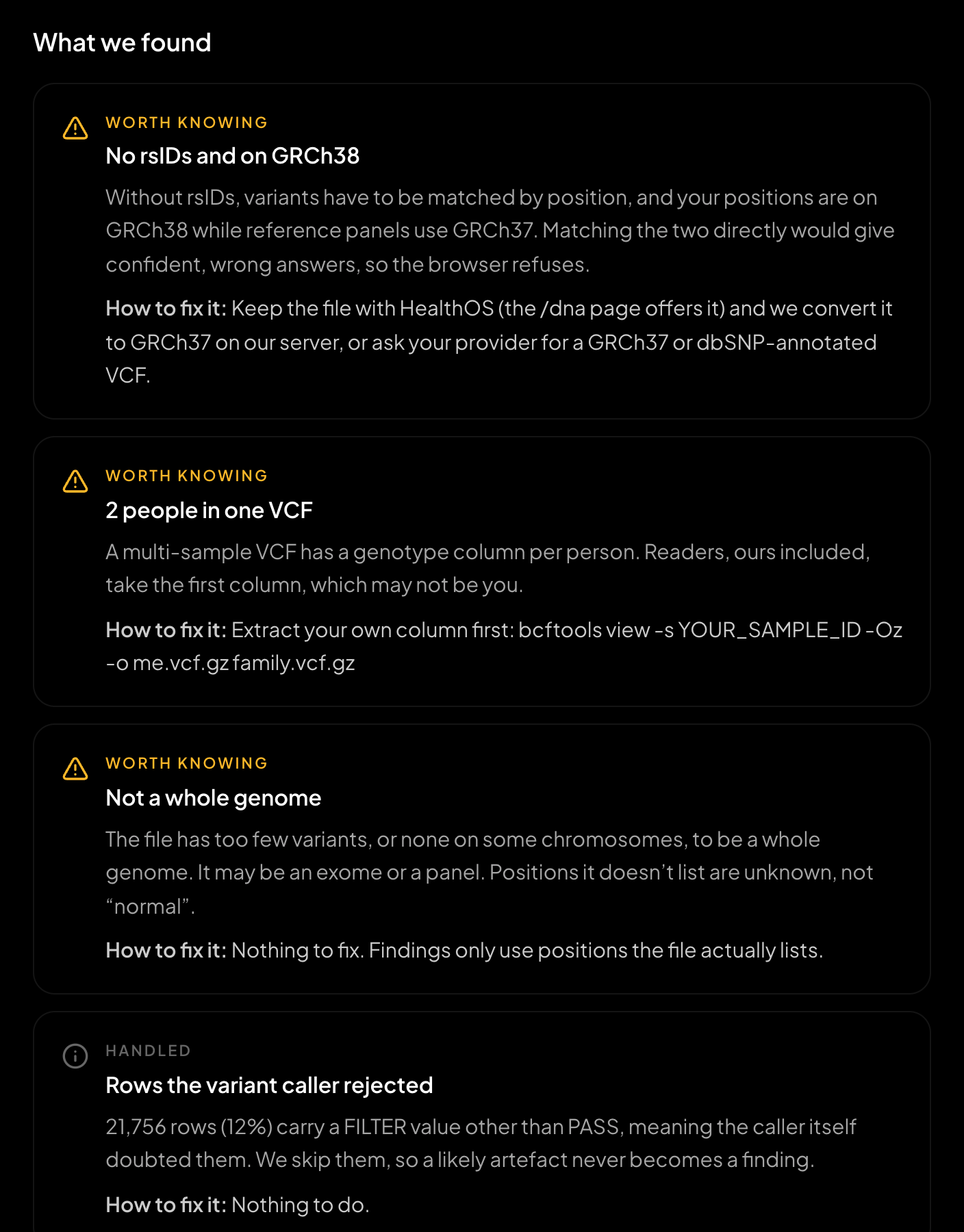
A whole-genome VCF with problems, and how to fix each one.
The file checker runs the same reader as the free report, in the same single pass, so its verdict is the report's. It also flags the quieter problems that make other tools refuse a file: a .vcf.gz in BGZF blocks that a browser's gzip reader stops reading after 64 KB, a family VCF with several people in it (tools read the first column), a gVCF full of reference blocks, a file re-saved by a spreadsheet, and a high no-call rate. Each comes with the fix another tool is most likely to need, down to the bcftools command.
Still stuck?
If your file is complete, from a listed company, and still fails, the error on /dna names the reason. We fix format problems when we find them: whole-genome VCFs without rsIDs were accepted for ancestry after two visitors were turned away with exactly that file.
Try your file again, and see exactly what the reader found: healthosx.com/dna
New to raw DNA files? Start with the full guide: How to Download & Analyze Your 23andMe Raw Data Free
Common questions
- Why was my DNA file rejected when I uploaded it?
- Usually for one of six reasons: you chose a report instead of the raw data, the download did not finish, the compression is one the browser cannot read, a whole-genome VCF has no rsIDs, the file is on a different genome build (GRCh37 or GRCh38) than the tool expects, or you picked a BAM, CRAM or FASTQ instead of the VCF. The free file checker at healthosx.com/dna/check names the cause and the fix. It reads the file in your browser, uploads nothing and needs no account.
- Why does MyHeritage or another matching site reject my file?
- Matching sites such as MyHeritage take chip files from the main testing companies (23andMe, AncestryDNA and others), and their upload pages list the formats they accept. A whole-genome VCF, a BAM or FASTQ, a report PDF or a file re-saved by a spreadsheet are common reasons for a refusal. If a site only takes chip files, convert the VCF to 23andMe format first, and check the site’s size limits.
- Can I check my DNA file before I upload it anywhere?
- Yes. The file checker at healthosx.com/dna/check reports the company, genome build, marker count, no-call rate, rsIDs and compression, and flags a family VCF, a gVCF or a spreadsheet-damaged file, each with the fix.
No raw DNA file yet?
Get a HealthOS DNA Kit: spit in a tube at home, and your ancestry, lineages and traits arrive in your HealthOS account, with the raw file.
See the DNA kitWritten by
HealthOS Research