DNA Explore Alternatives While Its Health Reports Are Paused
DNA Explore paused its health interpretations and AI answers for a safety review after finding errors in its rules. What that means for results you already have, and where to read your raw file now.
DNA Explore has paused its health and trait interpretations, its AI answers and new purchases for a safety review, after finding errors in its interpretation rules. It says earlier findings may be wrong, including reassuring ones, and there's no restoration date. You can still browse your raw data there. To get a fresh interpretation of the same file, healthosx.com/dna reads it free, in your browser (your DNA story needs no account), and shows the genotype and source behind every finding.
| HealthOS /dna | DNA Explore | |
|---|---|---|
| Health interpretations | Live, with the source shown for each finding | Paused for a safety review |
| AI answers | 5 free questions | Paused |
| Raw-data browsing | Variant lookup in the report | Still available |
| New purchases | Nothing to buy for the report | Paused |
| How alleles were validated | Every marker checked against Ensembl and the GWAS Catalog before release | Errors found in its own rules, hence the pause |
| Where your file is read | In your browser | In its app |
Scroll the table sideways for the rest →
Prices and features as published on each site on 2026-09-17; check them before deciding.
What the pause means for you
DNA Explore's own guidance is the right starting point:
- Don't use previous health findings or AI answers for medical or medication decisions.
- Reassuring results can be wrong too. A "normal" call you relied on is as suspect as a worrying one.
- Discuss any concerning result with a qualified professional.
It's worth saying that DNA Explore disclosed the problem and stopped, which is the responsible thing to do. Interpretation errors are an industry-wide hazard, not one company's failing.
Why interpretation rules go wrong
Most consumer DNA findings are lookups: find this rsID, check which letter you carry. The hard part is knowing which letter carries the effect, on which DNA strand. Genes sit on either strand, papers report either one, and a rule written the wrong way round gives exactly the opposite answer with full confidence.
We found this in our own early rules. Effect alleles recorded on the wrong strand in genes including TPMT and DPYD (both chemotherapy-safety genes) would have told carriers they were normal. The fix was a process: every marker is now validated against Ensembl and the GWAS Catalog before a rule is written, and each rule's source is recorded.
What to look for in any replacement
- Shows its working. Every finding should show the genotype it came from.
- Says "not covered". A missing position should never become a negative result.
- Validated alleles. Ask how effect alleles and strands were checked.
- Private by default. A browser-based read means your file doesn't need to go anywhere.
Reading your file again
- 1.Get your original raw file from your testing company (23andMe, AncestryDNA, MyHeritage).
- 2.Choose it at healthosx.com/dna.
- 3.Compare anything that matters with a clinical test before acting on it.
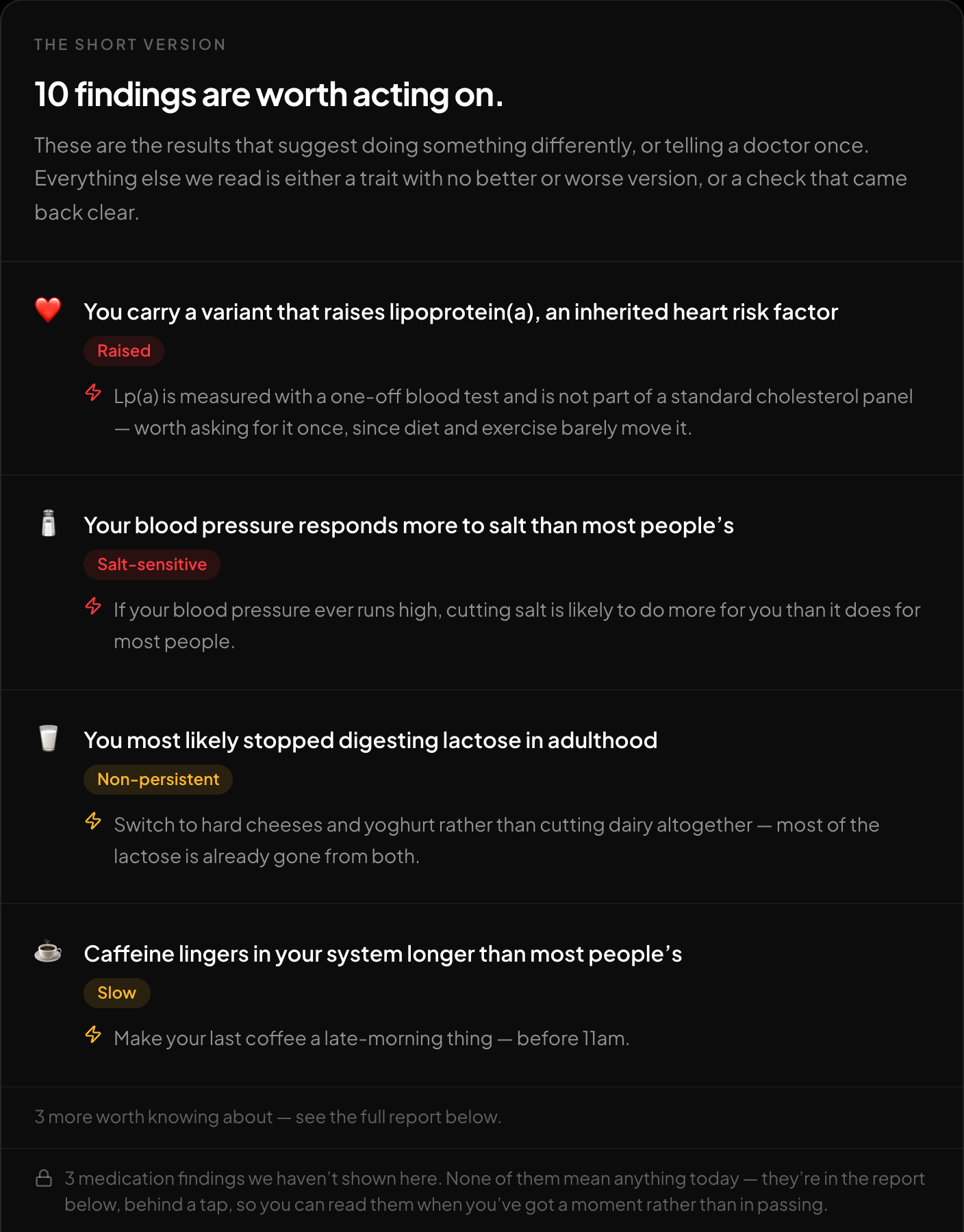
The short version: what is worth acting on, first.
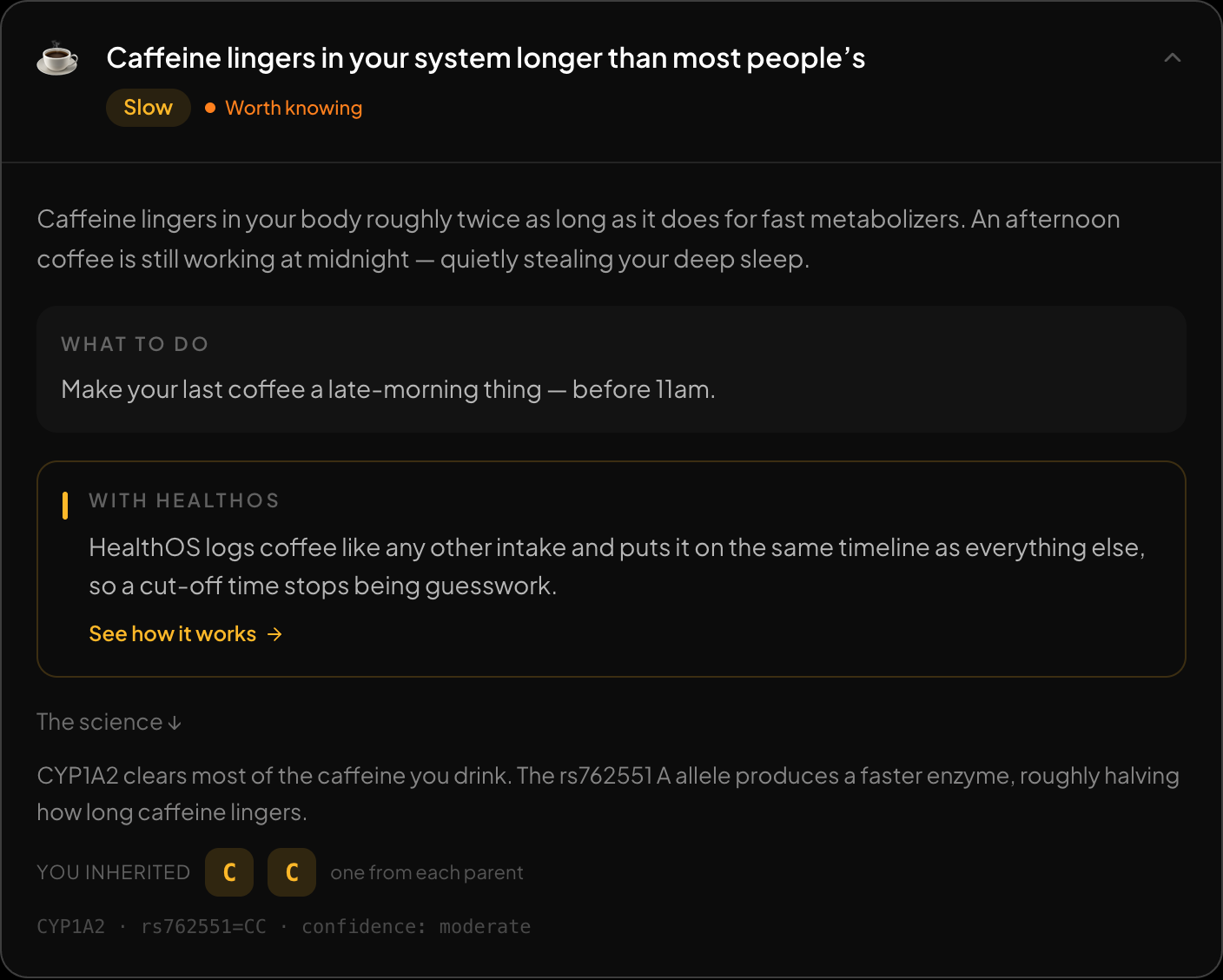
Every finding opens up: what it means, what to do, and the genotype behind it.
HealthOS /dna at a glance
- Price: the report is free. The story needs no account and no email; the full report opens in the HealthOS app after a one-time 6-digit email code. Ask your DNA gives you five free questions, then $1 for five more.
- Privacy: your file is read in your browser and not uploaded for the story or the report. Ancestry sends only the markers it needs and keeps them with your result until you delete them. The chat stores your file only if you choose to (encrypted, deletable).
- What you get: around 50 findings (food, sleep, movement, heart and metabolism, medication genes, traits), ancestry across 15 regions with the closest reference populations, and a chat that answers from your own results.
- Files: 23andMe, AncestryDNA, MyHeritage, FamilyTreeDNA, Living DNA, WeGene and whole-genome VCFs.
How to re-check a finding you relied on
If a DNA Explore result changed something you do, it's worth re-deriving it rather than assuming either tool is right:
- 1.Read your original file again on a tool that shows the genotype behind each finding (the shots above show what that looks like). If two readings agree on the genotype but disagree on the meaning, the disagreement is in the interpretation, not your DNA.
- 2.Look up the variant yourself. Search the rsID on Ensembl or ClinVar. Both list the alleles and, for ClinVar, what clinical significance has been reported.
- 3.Confirm anything consequential in an accredited lab before acting on it — that holds for every consumer tool, including ours.
The reassuring results matter too
It's natural to re-check a worrying finding and forget about a comforting one. But a rule written the wrong way round produces false "all clear" results just as easily. If a tool told you that you don't carry something, and that mattered to you, re-check it the same way.
FAQ
Does /dna have the same failure mode?
It could — every rule-based reader could. What differs is process: markers are validated against Ensembl and the GWAS Catalog before a rule is written, each finding shows its genotype and source, and a position your file doesn't cover is reported as not covered rather than as a negative.
What if my file is only in DNA Explore?
Your testing company still has the original. Download it again from 23andMe, AncestryDNA or MyHeritage and read that.
Re-read your file with every finding shown in full: healthosx.com/dna
No raw DNA file yet?
Get a HealthOS DNA Kit: spit in a tube at home, and your ancestry, lineages and traits arrive in your HealthOS account, with the raw file.
See the DNA kitWritten by
HealthOS Research