How to Get Your Full MyHeritage DNA File With Y and mtDNA Using a GDPR Request
A GDPR request to MyHeritage returns the raw microarray CSV with Y and mtDNA markers, not a whole-genome sequence.
A GDPR subject access request to MyHeritage will return the raw DNA file they already hold from your kit. That file is a microarray CSV, typically around 700,000 rows, and it already contains the Y chromosome and mitochondrial DNA markers their chip was designed to read. It is not a whole-genome sequence. If your account download works, you probably already have the Y and mtDNA markers; a GDPR request mainly gets you a copy when the download is broken, confirmation, or any stored derived calls.
A GDPR request returns the raw array file MyHeritage already holds, not a whole-genome sequence.
How do I make a GDPR/DPO request to get my full MyHeritage data file with Y and mtDNA?
Write one email to the privacy address published in MyHeritage's privacy policy, privacy@myheritage.com. If the policy lists a separate data protection officer address, use that address instead. Put "GDPR Article 15 subject access request" in the subject. Include your account email, full name, and kit number. Ask for the raw DNA file in CSV format with the autosomal, X, Y and mitochondrial markers, plus any stored Y-DNA or mtDNA haplogroup calls.
What MyHeritage actually holds
MyHeritage does not sequence your whole genome. It reads a fixed set of positions on a microarray chip, typically around 700,000 single nucleotide positions. The raw CSV includes a chromosome column with values 1 to 22, X, Y and MT. The Y and mtDNA parts are short: they are the specific positions on the chip, not continuous reads of the whole Y chromosome or whole mitochondrial genome. If you open the file and search for "Y" or "MT", you should see data rows there. That is what "full MyHeritage DNA file with Y and mtDNA" means in practice.
| Standard download | GDPR request | |
|---|---|---|
| File format | CSV | CSV |
| Y and mtDNA markers | Yes, chip positions | Yes, chip positions |
| Time | Minutes | Up to 30 days |
| Full Y or mtDNA sequence | No | No |
| Stored haplogroup or derived calls | Not usually | Only if MyHeritage stored them |
Scroll the table sideways for the rest →
Standard download and GDPR request draw from the same array data.
The mistake people get wrong is thinking GDPR can force MyHeritage to create a fuller sequence. It cannot. GDPR gives you access to data the company holds, and the company only holds the array result it generated from your saliva sample.
The exact wording to send
Use this list as your email. Replace the bracketed parts.
- Subject: GDPR Article 15 subject access request
- To MyHeritage Data Protection Officer,
- I am making a subject access request under Article 15 of the GDPR. Please send me a copy of all personal data you hold on me, including my full raw DNA genotype file in CSV format.
- I specifically request the autosomal, X, Y and mitochondrial DNA markers, any stored Y-DNA or mtDNA haplogroup calls, and any imputed or interpreted genetic data linked to my account.
- My account email is [your email]. My kit number is [kit number]. My full name is [your name].
- Please provide the data in a machine-readable format. If the standard dashboard download already contains the same file, please confirm that in writing. If you no longer hold the raw file, please confirm that too.
- [Your name]
How long it takes and what you get back
GDPR gives MyHeritage one month to respond. If they need ID, the clock pauses until you provide it. Under GDPR, a controller may extend that period by up to two further months if the request is complex or numerous; a raw file request should not normally qualify, but the controller decides and must tell you why. If the standard dashboard download already contains the same file, MyHeritage may confirm that in writing. If the standard download is broken or your account is closed, reply and ask them to confirm whether any additional raw DNA data exists beyond the standard file.
When the file arrives, it should be a CSV, often zipped, with a header line like RSID,CHROMOSOME,POSITION,RESULT. The chromosome column is where you check for Y and MT rows.
What the free DNA tool can and cannot read from that file once it arrives
The free MyHeritage-compatible DNA tool accepts the CSV. It parses the file in your browser, so the first trait and health story appears with no email and no upload. It reads the Y and MT markers from the file and reports maternal and paternal haplogroups on the device. It also reports traits, medication response, carrier status and single-variant health findings, and ancestry from the autosomal markers.
What it cannot do is turn a MyHeritage microarray file into a full Y-chromosome or full mitochondrial sequence. The haplogroup assignment is only as deep as the chip markers permit. If the file has the standard RSID column, the health findings work. If a file lacks rsIDs, health findings do not run. Ancestry on coordinates without rsIDs is supported only for sequencing VCFs without rsID annotations, not for MyHeritage array CSVs.
When the GDPR request is not needed
Try the standard download first. In your MyHeritage account, go to DNA > Manage DNA kits > Download raw DNA data. Open the resulting CSV. If you see chromosome values Y and MT, you already have the markers. A GDPR request will not produce more Y or mtDNA positions from the chip than that file contains. If the download is missing, the kit was deleted, or you want written confirmation of everything MyHeritage holds, then send the request.
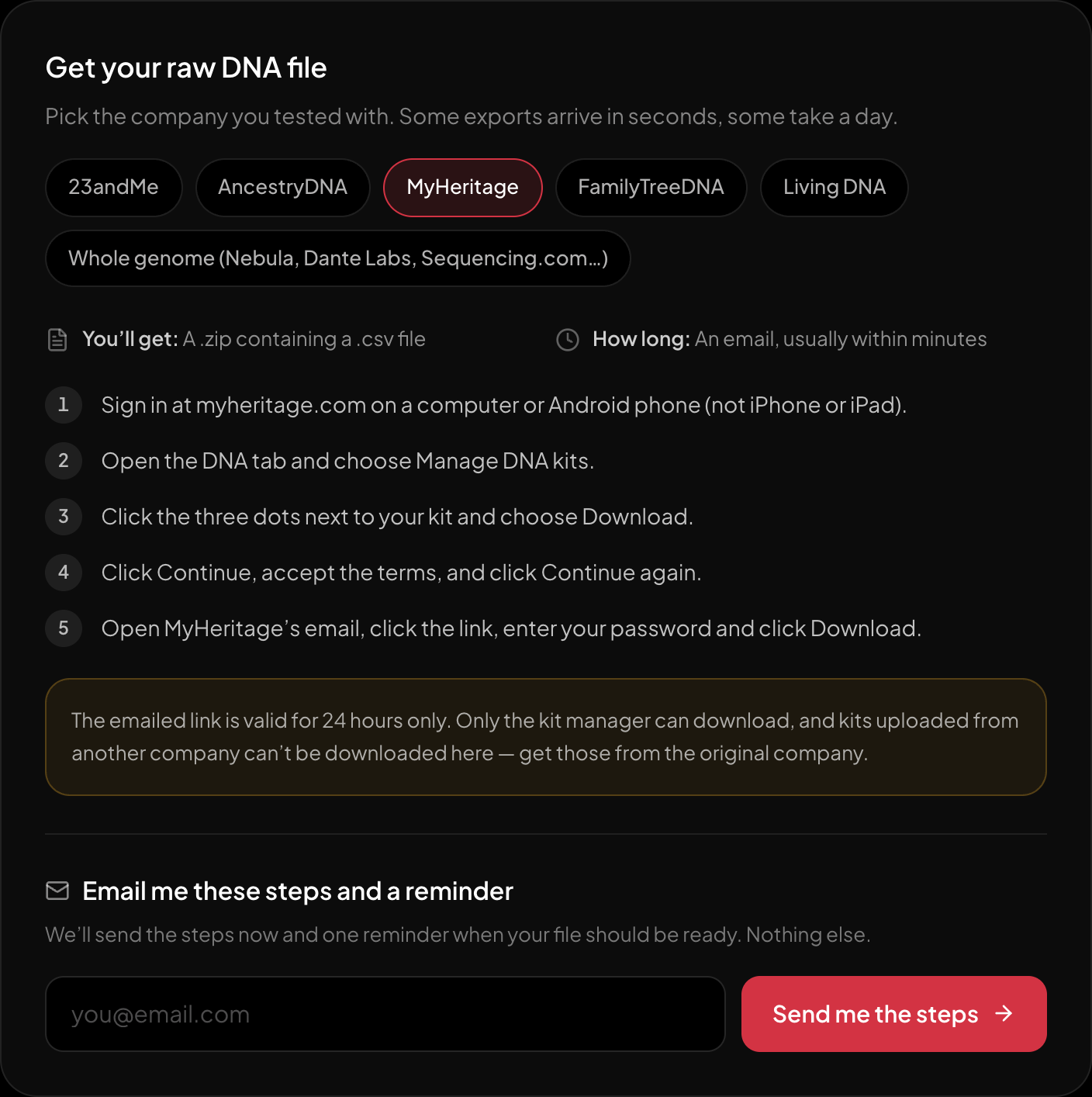
The download steps for MyHeritage, on the page itself.
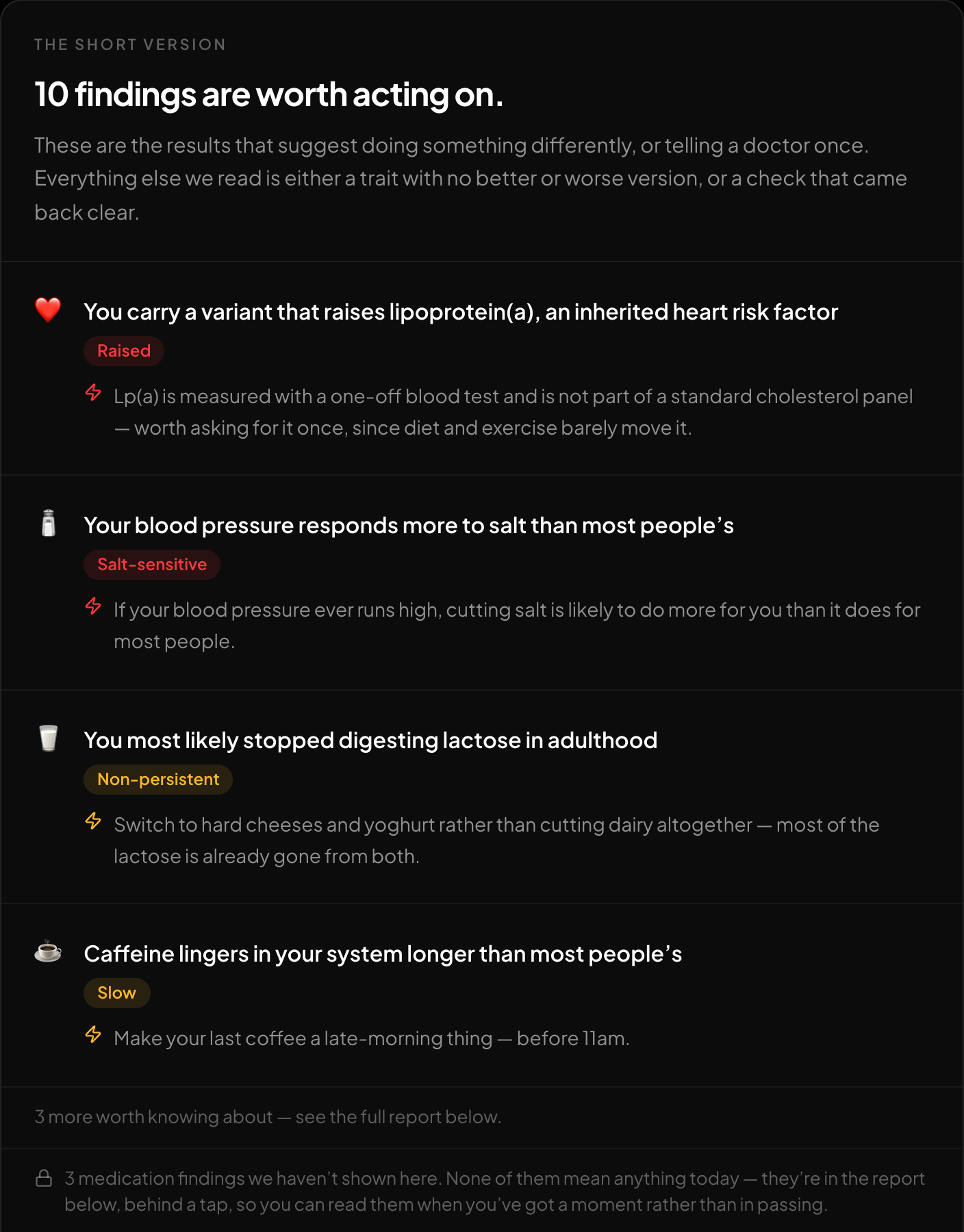
The short version: what is worth acting on, first.
Once you have the file, run it through the free HealthOSX DNA tool at healthosx.com/dna to get the haplogroups, traits, medication responses and carrier status and single-variant health findings in your own numbers.
New to raw DNA files? Start with the full guide: 23andMe Raw Data Interpretation Free in Your Browser
Written by
HealthOSX Research