How Long Does MyHeritage Take to Produce Raw DNA Data or Results
MyHeritage DNA usually takes 4 to 5 weeks from mailing to results and raw CSV download, with 3 to 4 weeks of that in the lab. Check the kit status page first.
MyHeritage usually takes about 4 to 5 weeks from the day you mail the kit to the day results and the raw DNA CSV appear in your account. The lab processing part is shorter, roughly 3 to 4 weeks after the sample is marked delivered. If your kit was activated and tracking shows arrival, the first thing to check before contacting support is the email you used and the DNA status page inside your MyHeritage account.
How long does MyHeritage take to produce raw data or results?
The official answer is 3 to 4 weeks from the moment the lab receives your sample, not from when you drop it in the mail. Shipping typically adds 3 to 7 business days domestically and more internationally, so the total from postbox to results is usually 4 to 5 weeks. Some kits finish in 3 weeks. Others take 6. A kit that sits in customs or arrives during a holiday period can add another week without anything being wrong.
The raw data file is not sent by email. It appears as a downloadable CSV in your account once the ethnicity estimate and DNA matches are ready. The CSV contains hundreds of thousands of markers. You can download it from the DNA settings for the specific kit.
The countdown starts when the lab scans your sample as delivered, not when you post the kit.
What the wait actually covers
The wait is not one long black box. It is a sequence of steps, and each one has a normal range.
- Shipping to the lab. This is typically 3 to 7 business days, but international post can sit in customs for a week or more.
- Accessioning. The lab receives the tube, scans the barcode and links it to your activated kit. This is fast, often same day, but it only happens after the package is physically opened and sorted.
- DNA extraction. The lab isolates DNA from the saliva or cheek cells in the sample.
- Genotyping. The DNA is applied to a microarray chip and scanned. The scanner reads hundreds of thousands of positions in your genome.
- Quality control. The lab checks the call rate, which is the fraction of markers that produced a reliable signal. If the call rate is too low, the sample may be retested or failed.
- Analysis and report generation. Ethnicity estimates and DNA matches are computed from the genotype calls.
- Raw data export. The lab or platform produces the CSV file you download.
The lab processing time is the biggest chunk. Most of that is not the scanning itself. The time is taken up by batching samples, extraction, QC, data processing and queue position. Labs run large batches, so your sample waits for the next batch. The exact batch timing inside the lab is not published, so you cannot predict the day it will enter a run from the tracking page.
Why some kits take longer
A kit can miss the normal window for a small number of boring reasons.
- The kit was not activated before mailing. If the barcode is not registered to an account, the lab cannot attach the result to you. This can stall the process until support resolves it.
- The sample had a low DNA yield or a low call rate. The lab may attempt a second extraction from the original tube. If that fails, MyHeritage may send a replacement kit. A retest usually adds about two to three weeks.
- The sample was damaged or leaked in transit.
- The tracking says delivered, but the lab has not yet marked it received. This is common after weekends and holiday volumes.
- The account email address was mistyped or the result notification went to spam.
The most common mistake is to count from the order date or the day you mailed it. The official 3 to 4 week window does not start until the package is scanned as received at the lab. Shipping at both ends is extra.
When can I download the raw DNA CSV?
Once your results are ready, the raw data file is available in the same place where you manage your DNA kit. Log in to MyHeritage, open the DNA menu, choose Manage DNA kits, find the kit and use the download option. The file is a zip containing a CSV.
The CSV has four main columns: RSID, chromosome, position and result. Each row is one marker, and the result is two alleles such as AG or CC. This is the file you can use with third party tools.
The CSV is typically released at the same time as the ethnicity estimate, but same-day release is not guaranteed. If you see results but no download link, give it a few hours. If it is still missing after a day, check that you are looking at the right kit. Some people manage more than one kit on one account.
First thing to check before contacting support
Before you open a ticket, check three things.
- 1.Open the MyHeritage DNA status page for the kit. Does it say the sample arrived at the lab, is processing, or is complete? If it does not say arrived, the package may still be in transit or waiting to be scanned.
- 2.Search your email, including spam, for the subject line about DNA results. The notification may have arrived while you were not looking.
- 3.Confirm the kit is activated on the account you are checking. A kit bought as a gift or activated under another email will not show results in your login.
If the status page says the sample arrived at the lab more than four weeks ago and there is no result, then support is the right next step. If the status page says delivered to the lab less than four weeks ago, the most likely answer is that it is still within the normal window.
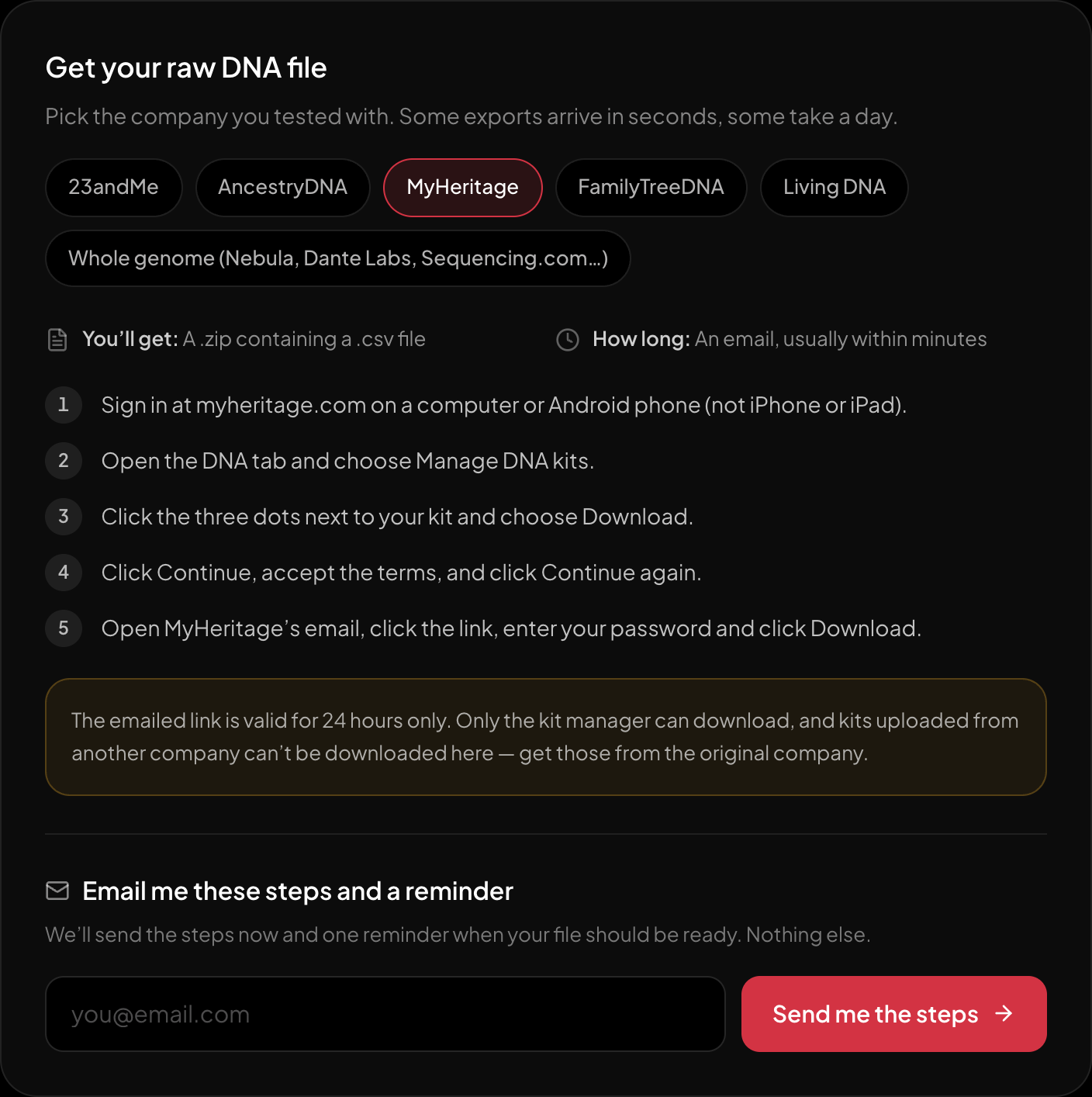
The download steps for MyHeritage, on the page itself.
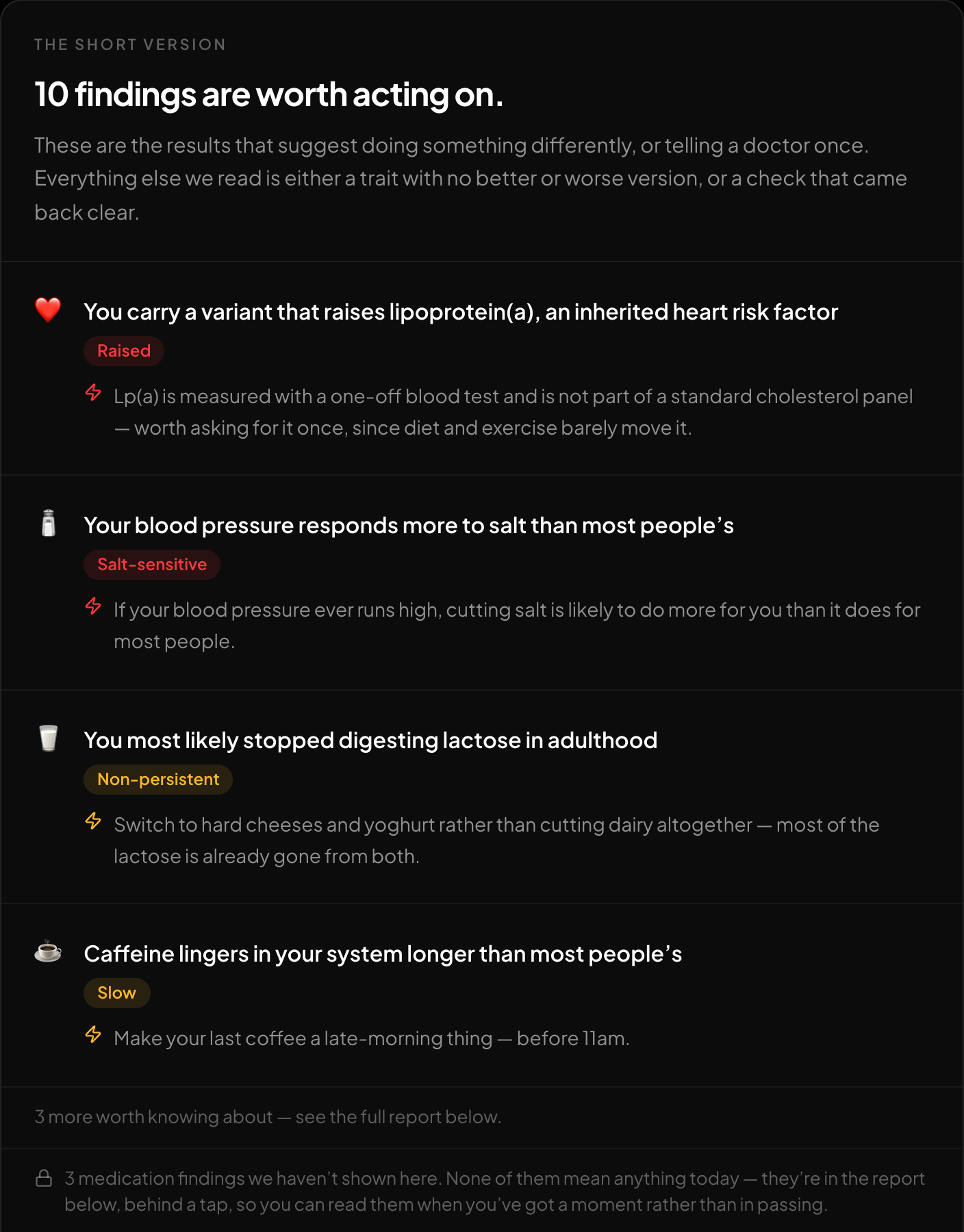
The short version: what is worth acting on, first.
After you download the MyHeritage CSV, you can run it through the free DNA tool at HealthOSX DNA. It reads the raw file in your browser and reports traits, medication responses and carrier-relevant findings, with an optional ancestry breakdown. No account is needed for the first part, and the full report is free after a one-time email code.
New to raw DNA files? Start with the full guide: 23andMe Raw Data Interpretation Free in Your Browser
Written by
HealthOSX Research